Posting Comments In WordPress
Comments in your WordPress pages allows visitors to have a discussion with you and each other. When you activate comments on a Page or post, WordPress inserts several text boxes after your content where users can submit their comments. Once a comment has been approved by an administrator, it appears underneath your content. Whether you want to customize how you receive comments or tweak how your site displays comments, WordPress provides a thorough set of options to build a community from the visitors to your site.
Comment Screen
Every Comment that you make on WordPress are displayed on the Comments dashboard in your WordPress admin area. It displays all comments by default.
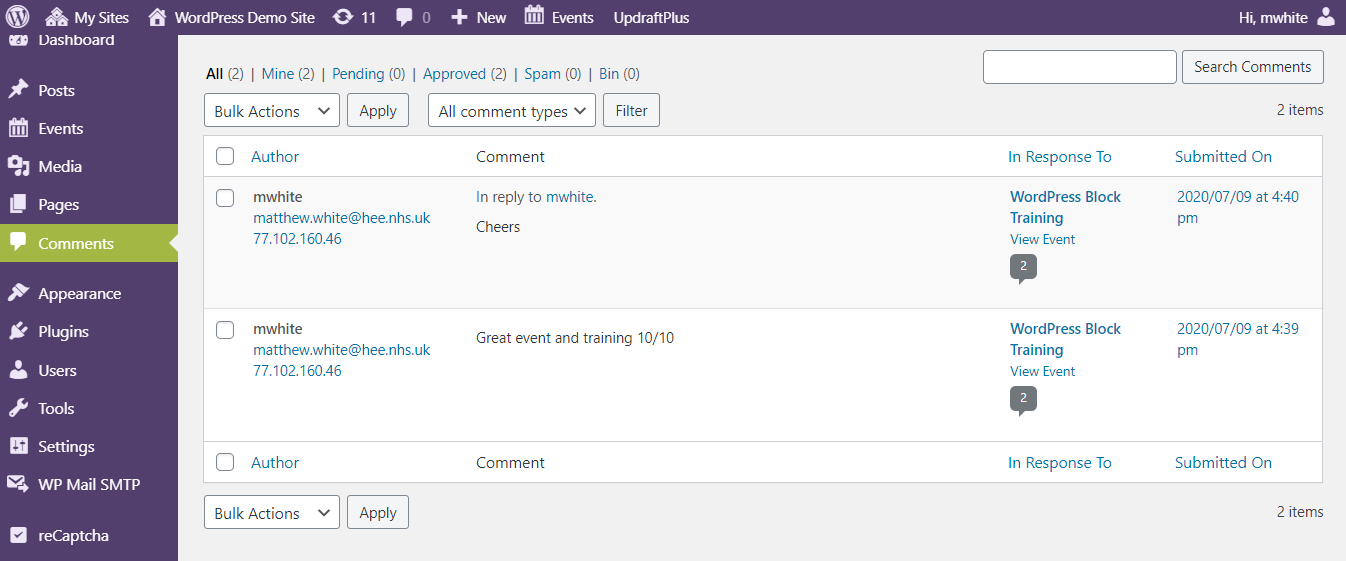
You can switch the view to see Pending, Approved, Spam, and Trash comments:
- Pending: comments submitted by your visitors, but won’t be visible on your blog posts unless you approve them.
- Approved: comments published and are publicly visible on your blog posts by all your website visitors.
- Spam: comments flagged as possibly unwanted or irrelevant, and aren’t visible to your site visitors.
- Trash: comments marked as unwanted and will be automatically deleted for good after 30 days.
The below video shows you the basics on how to administrate and view the comment screen.
Comments in WordPress